========= THIS SERVICE HAS BEEN DISCONTINUED AS OF AUGUST 21, 2007 =========
The Repository tab page is used to set up access to the Offsite Repository and to view records stored there.
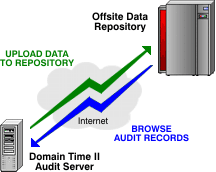
The Offsite Repository is a data retention service designed to accept and store audit records
collected by Domain Time II Audit Server. Audit Server has the unique ability to upload audit records over the Internet to the
secure Offsite Repository to absolutely protect the integrity of the audited time sync data collected from the network.
In addition to preventing data loss and tampering, the Offsite Repository simplifies the process of maintaining the physical
data for the duration of the desired data retention period. All data storage, backup, capacity planning and maintenance of the
audit data is handled by the Repository.
Despite having the data stored off-premises, access to the audit records is immediate, since the Repository is accessible
to authenticated users via a web-browser. Data is sorted and stored chronologically, so it's a simple matter for a user to
locate any desired audit and verify whether any machine was indeed synchronized at that time - last week, last month, or last year.
Why Do I Want To Use an Offsite Repository?
Data Integrity
Using the Offsite Repository guarantees the integrity of your audit data in several ways:
It removes the audit data from local systems to a location where data can only be viewed, never deleted. The data remains intact,
even should someone gain access to an administrative account (or even to the Audit Server itself) at your site.
The risk of data loss due to local hardware failure or disk storage space issues on the Audit Server is minimized.
The Repository also keeps additional information about who makes configuration changes to the Audit Server itself, further establishing
a complete train of evidence that the audit information is accurate and free from tampering.
Set-And-Forget
All Domain Time II functions (time sync, monitoring, audit data collection, etc.) are automatic. When the Offsite Repository is used,
the final critical steps of organizing, maintaining, and providing access to view the records are automatic as well.
If a Repository is not used, then the local administrator is responsible for ensuring that there is sufficient room for the data, that
access to the data files is protected, data files must be manually sorted, and there is no provision for remote viewing of the records.
The Audit Server and Offsite Repository communicate with each other over TCP port 80 (HTTP) or port 443 (HTTPS), which are standard web-browsing ports.
This means that communication can be established with opening any additional firewall ports, or compromising network security in any way.
The product supports most web proxies as well, so it's extremely simple to establish the necessary connectivity.
Easy access to data
Since the Repository uses standard web protocols, it's simple to allow authenticated users to browse the site for existing records.
Data on the Repository is automatically sorted chronologically (by Year and Month), so users can quickly find the time sync information
for any monitored machine at any particular time.
Data is available at any time, regardless of whether the Audit Server is currently online.
Long-term maintenance considerations
As with any other data storage, maintaining Domain Time II Audit Server data records requires a certain amount of system
management and administration. Since audit data is typically retained on the scale of years, it's critical that the data be
planned for and managed appropriately.
Using the Offsite Repository removes the burden of maintaining the data from your support staff. There's no need for capacity planning,
backup strategies, disaster-recovery considerations, or other care-and-feeding tasks for maintaining the data.
Also, since the data retention periods often outlast any particular administrator, there's no inadvertent loss of data because the new staff
didn't know to backup the data, or allowed the server to fill up with data they didn't know was being collected.
Cost
Given all of the various immediate costs of maintaining data locally (hardware costs, maintenance costs, backup media, admin time, etc.), as
well as potential costs of lost data or downtime due to admin turnover or other unforseen local admin issues, it's far cheaper to off-load
the data collection and storage of audit data to the Repository.
The cost of Repository Services is easily estimated and budgeted for (see the Repository Fee Estimator to
get an idea of how economical the Repository really is.
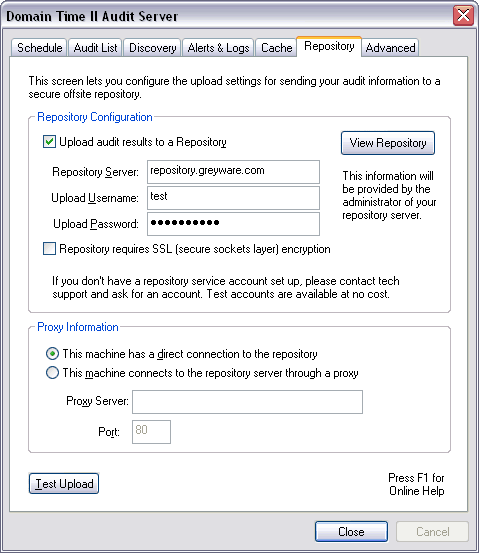
Repository Configuration
Controls how Audit Server uploads audit data to an offsite repository.
Upload audit results to a Repository
Check this box to tell Audit Server you want audit results uploaded.
In order to upload audit results, you will need to have an account set up by the
administrator of the repository service. You may use account name test with
password test for testing. Please write to Greyware Tech Support
to have your own account set up. See the Repository Fee Estimator to get an idea of the amount of storage you'll be
using and the approximate repository costs to store the data.
If you are evaluating Audit Server, you may use the TEST account for no charge, which allows you to store records temporarily in a general area
set up for evaluation testing. The TEST account uses the following info:
Username: test
Password: audit
If you wish to have a private area set up during your evaluation period, please contact
Greyware Tech Support.
Repository requires SSL (secure sockets layer) encryption
This checkbox is provided for repositories that support/require SSL connections. The
Greyware Repository currently does not require SSL, so this box should be left unchecked.
View Repository...
This button will launch your web browser and connect to the specified repository server using
the username and password you have entered. You may browse your uploads and double-click any
file to view it using the DTReader program.
The DTReader program (DTREADER.EXE) is automatically
associated with files having the extension .dtad (DT Audit Data) during the installation of Audit Server.
DTReader may be used to view either data files in the Local Cache or data files retrieved from
the Offsite Repository.
Browsing the Repository from another machine
If you wish to browse and view audit records from some machine other than the Audit Server, you may copy the DTREADER.EXE file from the
%SystemRoot%\System32 folder on the Audit Server to the %SystemRoot%\System32
folder of your other machine. You can then associate .dtad files with the DTREADER.EXE program
using the standard Windows program association tools if you wish.
The URL you should use in your web browser to view the Repository will be:
http[s]://[DNS name of the repository]/[account username]
For example, if you wish to view the data files for the OurCompany account on the Greyware Repository Server, the URL would be:
http://repository.greyware.com/ourcompany/
or, if the server uses HTTPS for encryption:
https://repository.greyware.com/ourcompany/
When you browse to the URL, you'll be prompted to enter your account username and password (this is the same username/password
used by the Audit Server to upload).
Proxy Information
Allows you to specify whether you connect to the repository server through a web proxy.
This machine has a direct connection to the repository
Use this selection if you have a direct network connection (no proxy) to the repository server.
This machine connects to the repository server through a proxy
Use this selection if your machine can only connect by going through an HTTP (Web) proxy server. Keep in mind that the account being
used to run the Audit Server service (the System account by default) must be able to access the proxy.
If your proxy requires a specific user account be used, you must change the Audit Server service to run under that user's
account (and that account must have been granted Log on as a Service rights).
See this page for more information on granting the Log on as a Service right.
Test Upload
This button runs a test upload to the repository server, using the username and password you have
specified.
The progress of the test upload will be displayed graphically. You can then immediately browse the Repository to see your test upload, which
will be in the current month's folder in a file named Upload Test.txt